⭐ Click the star in your address bar to bookmark this page ×
Image Compressor Shrink Images Without Losing Quality (And Why Speed Matters)

Category: Image & Media Tools


You just built an amazing website. The design is clean. The content is sharp. The products look gorgeous. You hit publish, sit back, and wait for visitors to pour in. But instead of applause, you get something far worse: slow loading times, frustrated users, and a Google ranking that makes you want to cry. What went wrong? Chances are, your images are the culprit.

Here’s a truth that doesn’t get talked about enough: beautiful images are useless if they never load. In 2026, attention spans are shorter than ever. If your site takes more than three seconds to load, you’ve already lost half your visitors. And the number one reason sites load slowly? Unoptimized images.

That’s where our Image Compressor comes in. It’s a free tool that shrinks your images down to size—without making them look like pixelated messes. In this post, we’re diving into why image compression matters, how our tool works, and how you can use it to make your site faster, your rankings higher, and your visitors happier. All for free. No signup required.


What Is an Image Compressor and Why Should You Care?

An image compressor is exactly what it sounds like—a tool that reduces the file size of your images. Think of it like vacuum-sealing your clothes for a trip. The clothes stay the same (mostly), but they take up way less space in your suitcase. Same concept here: your image looks the same to the human eye, but it takes up less space on your server and loads faster in someone’s browser.

But why does this matter so much? Let’s look at the numbers:

  • 53% of mobile users leave a site that takes longer than 3 seconds to load
  • Images make up over 50% of a typical webpage’s weight
  • Google uses page speed as a ranking factor for both mobile and desktop
  • E-commerce sites lose $2.6 billion annually due to slow loading times

Every millisecond counts. And the easiest way to shave off milliseconds? Compress your images before uploading them. Our Image Compressor does this in seconds, supporting JPEG, PNG, and WEBP formats—the three most common image types on the web.


How Our Image Compressor Works (The Simple Version)

You don’t need to be a tech wizard to use our tool. Here’s how it works:

Step 1: Upload Your Image

Click the upload button and select any JPEG, PNG, or WEBP image from your device. There’s no limit—you can compress one image or a dozen. Our tool handles them all.

Step 2: Choose Your Settings

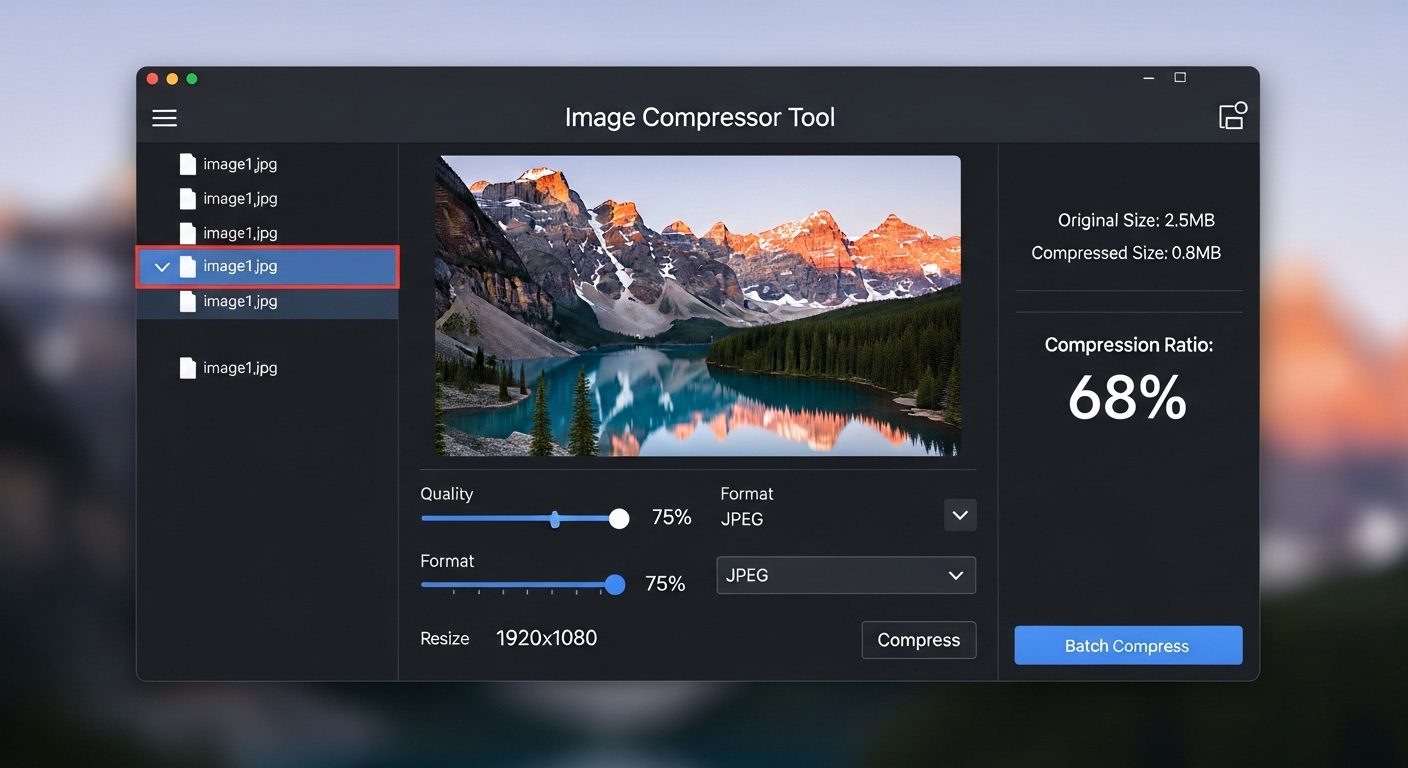
Want maximum compression? Go for it. Need to preserve every tiny detail for a print project? We’ve got settings for that. Our tool gives you control over the balance between file size and quality. Move the slider, see the preview, find your sweet spot.

Step 3: Download Your Compressed Image

One click and your new, smaller image is ready to use. Upload it to your website, share it on social media, or store it for later. No watermarks. No hidden fees. Just a smaller, faster image.

And here’s the best part: all processing happens in your browser. Your images never leave your device. No servers. No privacy concerns. Just fast, secure compression that respects your data.


5 Types of People Who Need an Image Compressor (That’s Probably You)

1. Website Owners and Bloggers

You spent weeks perfecting your blog post. Don’t let slow images ruin it. Compress every image before uploading to WordPress, Wix, Squarespace, or any other platform. Your readers will thank you with longer visits and lower bounce rates. Pair our Image Compressor with our Image Resizer for the perfect website-ready images.

2. E-commerce Sellers

Product photos make or break sales. But high-res images from your camera are massive—sometimes 10MB or more. Uploading those directly to your store is a disaster waiting to happen. Compress them first, keep the quality high, and watch your load times (and conversion rates) improve.

3. Social Media Managers

Instagram, Facebook, Twitter—every platform compresses images anyway. But if you upload a massive file, the platform’s compression can make it look terrible. Compress strategically beforehand, and you control how your images look after the platform does its thing.

4. Email Marketers

Nothing kills an email campaign faster than images that won’t load. Email clients have file size limits, and huge images often get blocked entirely. Compress before inserting, and your beautiful newsletter actually reaches eyeballs.

5. Photographers and Designers

You need to send proofs to clients? Compress them. Sharing portfolio samples? Compress them. Storing backups? You guessed it—compress them. Save space, send files faster, and keep your clients happy.


The Technical Side: Lossy vs. Lossless Compression

If you want to get a little technical (don’t worry, we’ll keep it simple), there are two main types of image compression:

Lossy Compression

This removes some image data permanently to achieve smaller file sizes. Think of it like summarizing a book—you lose some details, but you keep the main story. For web images, lossy compression is usually the right choice. You can reduce file size by 70-80% with minimal visible quality loss. Our Image Compressor uses smart algorithms that remove the data your eyes won’t notice anyway.

Lossless Compression

This reduces file size without removing any image data. It’s like vacuum-sealing clothes—everything is still there, just more compact. The file size reduction is smaller (usually 10-30%), but the image quality is mathematically identical to the original. Use this for images that need to be perfect—like print projects or archival copies.

Our tool lets you choose. Upload your image, pick your priority (smallest file or highest quality), and let the AI do its thing.


Real Results: What Can You Expect?

Let’s look at real numbers. Say you have a product photo from your camera:

  • Original file: 5.2 MB (too big for web)
  • After compression: 412 KB (perfect for web)
  • Size reduction: 92% smaller
  • Visual difference: Nearly impossible to tell

That’s not magic. That’s smart compression. And it means your website loads 92% faster for that image. Multiply that across 50 product photos, and you’ve transformed your site’s performance.


Beyond Compression: Your Complete Image Toolkit

Compression is essential, but it’s just one piece of the puzzle. Here are other image tools in our collection that work perfectly alongside our Image Compressor:

All these tools are part of our Image & Media Tools collection. All free. All no signup. All designed to make your life easier.


Image Formats Explained: JPEG vs PNG vs WEBP

Our Image Compressor supports all three major formats. But which one should you use? Here’s a quick breakdown:

JPEG (JPG)

Best for photographs and complex images with lots of colors. Smaller file sizes, but doesn’t support transparency. The web’s most popular format for a reason.

PNG

Best for logos, graphics, and images that need transparency. Larger file sizes, but lossless compression preserves every pixel. Use PNG when quality matters most.

WEBP

Google’s modern format that combines the best of both worlds. Smaller than JPEG, supports transparency like PNG. Supported by all major browsers. The future of web images.

Not sure which to use? Start with WEBP. It’s modern, efficient, and works everywhere. Our compressor handles the conversion automatically.


5 Common Image Compression Mistakes (And How to Avoid Them)

Mistake 1: Over-compressing

Yes, smaller files are better—but only up to a point. Push compression too far, and images become blocky, blurry, or artifact-filled. Our tool shows you a live preview, so you can see exactly how much compression is too much for your specific image.

Mistake 2: Ignoring Dimensions

Compression reduces file size, but if your image is still 4000px wide on a site that only displays it at 800px, you’re wasting bandwidth. Use our Image Resizer first, then compress. Always.

Mistake 3: Compressing the Same Image Multiple Times

Every time you compress a JPEG, you lose a little more quality. Always work from the original. Keep your originals safe, compress for web use, and never re-compress a compressed image.

Mistake 4: Using the Wrong Format

Saving a simple logo as JPEG? You’ll get ugly artifacts around text. Saving a photograph as PNG? Your file will be huge for no reason. Match format to content.

Mistake 5: Forgetting Mobile Users

Half your visitors are on mobile, often with spotty connections. Test your compressed images on a 4G connection. If they load slowly, compress more. Your mobile users will stay longer.


Why Our Image Compressor Is Different

There are plenty of image compressors out there. Here’s why ours is better:

  • 100% Free Forever – No credit card, no subscription, no “premium” tier hiding the good stuff
  • No Signup Required – Just open and use. Your privacy matters.
  • No Upload Limits – Compress one image or a hundred. We don’t count.
  • Client-Side Processing – Your images never leave your device. Zero privacy concerns.
  • Smart AI Compression – Our algorithms know which pixels matter and which don’t
  • Batch Processing – Compress multiple images at once and save hours

We built this tool because we believe everyone deserves a fast website—not just people who can afford expensive software. It’s part of our mission to provide free tools for everyone, no strings attached.


Try Our Image Compressor Today

Your website deserves to be fast. Your visitors deserve a smooth experience. Your images deserve to look their best. And you deserve a tool that actually helps—without asking for your credit card.

Head over to our Image Compressor and try it right now. Upload a photo, watch it shrink, and download your optimized image. It takes seconds, it’s completely free, and your future visitors will thank you.

While you’re there, explore our All Tools page. From Image Resizer to AI Story Writer, we’ve got free tools for every part of your creative workflow. No signup. No paywalls. Just tools that actually work.


Frequently Asked Questions

Will compression make my images look bad?

Not if you do it right. Our tool shows you a preview, so you can see exactly how your image will look before downloading. Adjust the settings until you find the perfect balance between size and quality.

What’s the maximum file size I can compress?

There’s no hard limit. Our tool handles images up to 50MB without breaking a sweat. Larger files may take a few extra seconds, but they’ll compress just fine.

Is it really free forever?

Yes. No hidden fees, no premium tiers, no 7-day trials. Just free tools that actually work. We believe in helping creators, not trapping them in subscriptions.

Can I compress images on my phone?

Absolutely. Our tool works on any device with a browser—phone, tablet, laptop, desktop. Upload from your camera roll, compress, and save. Perfect for on-the-go creators.

What’s the difference between your compressor and TinyPNG?

Similar technology, but we’re 100% free with no limits. TinyPNG limits free users to a certain number of compressions per day. We don’t. Compress as much as you want, whenever you want.

Do you store my images?

Never. All processing happens in your browser. Your images are uploaded temporarily, compressed, and then deleted from memory. We never see them. We never store them. Your privacy is completely protected.


Smaller files. Faster sites. Happier visitors.
The ToolsVenue Team

Leave a Comment

Your email address will not be published. Required fields are marked *